You can run the installation executable (setup.exe) directly from the
Download section. However it is recommended to copy it first onto your
hard disk and run it from there. You should download in one of the C:\
subdirectories, and NOT on your desktop.
If you are using Windows Vista or Windows 7 operating systems, go to
Control Panel-->User account-->Turn user account OFF. Unless this
feature is turned off the program may malfunction.
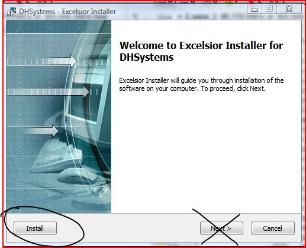
Run Setup.exe. When the first screen is displayed click on Install rather
than on NEXT. The installation program will allow you to choose a
location on your hard disk, but it is advisable to accept the default
location, which is [C:\DH\DHSYSTEMS].
Do not install DH Systems within Program Files or Windows
directory, or any location where opening files may be subject to
limitations.
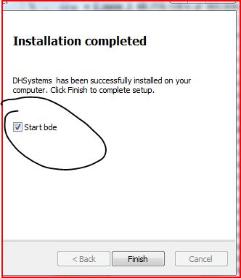
Once the DH SYSTEMS program files have been uncompressed, the
installation program will prompt you to click on FINISH, and you will see
a checked button with "Start Bde". Make sure you to leave it checked.
This will trigger the second phase of the process, which is the Borland
database Engine installation. This feature is needed for DH SYSTEMS
to run.
Click FINISH again and accept all default settings by clicking NEXT at
every stage until the final screen. Then click FINISH again.
At this stage the installation procedure of DH Systems is completed.
The installation procedure Setup.exe will have generated a number of
subdirectories and files under C:\ DH\DHSystems on your hard disk.
Click on C: \DH\DHSystems\setup\dhexec\DHSystems.bat to start the
program.
DH Systems will prompt you for a username and password. Both are
initially MYNAME by default. The Security Menu will give you the
opportunity to change this.
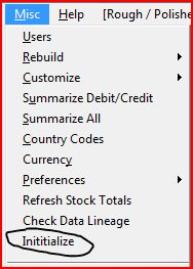
When DH Systems opens for the first time, an initialization program
must be launched before anything else. Run Menu --> [Misc] --->
[Initialize]
The first data you will need to enter relates to contacts. Click on
[Directory] and choose [New]. Enter suppliers, customers banks and
sorters.
The Help System. is still under construction, but the existing information
you may already be useful.
In order to get familiar with the system you need to feed it with
purchases, after which it generates stock items that you can split, mix,
re-split, re-mix, sort, sell, etc.
Later you can go through the accounting modules such as outstanding
payments, balances of account, Credit, Debit, etc...
Enjoy.
Download section. However it is recommended to copy it first onto your
hard disk and run it from there. You should download in one of the C:\
subdirectories, and NOT on your desktop.
If you are using Windows Vista or Windows 7 operating systems, go to
Control Panel-->User account-->Turn user account OFF. Unless this
feature is turned off the program may malfunction.
Run Setup.exe. When the first screen is displayed click on Install rather
than on NEXT. The installation program will allow you to choose a
location on your hard disk, but it is advisable to accept the default
location, which is [C:\DH\DHSYSTEMS].
Do not install DH Systems within Program Files or Windows
directory, or any location where opening files may be subject to
limitations.
Once the DH SYSTEMS program files have been uncompressed, the
installation program will prompt you to click on FINISH, and you will see
a checked button with "Start Bde". Make sure you to leave it checked.
This will trigger the second phase of the process, which is the Borland
database Engine installation. This feature is needed for DH SYSTEMS
to run.
Click FINISH again and accept all default settings by clicking NEXT at
every stage until the final screen. Then click FINISH again.
At this stage the installation procedure of DH Systems is completed.
The installation procedure Setup.exe will have generated a number of
subdirectories and files under C:\ DH\DHSystems on your hard disk.
Click on C: \DH\DHSystems\setup\dhexec\DHSystems.bat to start the
program.
DH Systems will prompt you for a username and password. Both are
initially MYNAME by default. The Security Menu will give you the
opportunity to change this.
When DH Systems opens for the first time, an initialization program
must be launched before anything else. Run Menu --> [Misc] --->
[Initialize]
The first data you will need to enter relates to contacts. Click on
[Directory] and choose [New]. Enter suppliers, customers banks and
sorters.
The Help System. is still under construction, but the existing information
you may already be useful.
In order to get familiar with the system you need to feed it with
purchases, after which it generates stock items that you can split, mix,
re-split, re-mix, sort, sell, etc.
Later you can go through the accounting modules such as outstanding
payments, balances of account, Credit, Debit, etc...
Enjoy.


Installation
HELP
DH SYSTEMS
 |
| |
 |
| |
 |
| |
 |
| |
 |
| |
 |
| |
 |