Tools - Importing Stock
HELP
DH SYSTEMS
CAUTION!
Importing existing Stock is a one-time-only operation because It will overwrite almost the entire existing Database
Sales, Purchases, Commissions, Debit, Credit, Cash-Flow and all related information will disappear.
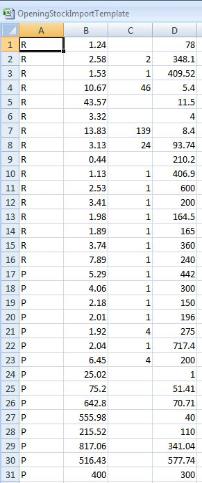
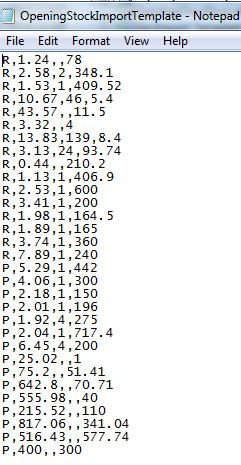
To import Stock the user must prepare a CSV file with basic information in the following order:
CATEGORY (P or R - stands for Rough or Polished)
WEIGHT (number of carats of the parcel)
STONES (number of stones if applicable - NOT required)
PRICE (price per carat)
If you are using a spreadsheet to generate the CSV file then make sure the third column (STONES) appears in general
format (no decimals).
The 2nd and the 4th column must appear with 2 decimals, even if they are zero (11.25, 2.00, etc..)
The text file must be saved in CSV format (comma delimited).
Excel: Notepad:
After the Import process the imported data will be marked with origin [ARCHI]. This means this stock is not subject to cost
recalculations. Its total value will be stored as a starting point at the date it was imported.
During the import procedure the new stock is defined with dummy specifications. The user must then update every stock
item according to details as defined in Specifications.
Importing existing Stock is a one-time-only operation because It will overwrite almost the entire existing Database
Sales, Purchases, Commissions, Debit, Credit, Cash-Flow and all related information will disappear.
To import Stock the user must prepare a CSV file with basic information in the following order:
CATEGORY (P or R - stands for Rough or Polished)
WEIGHT (number of carats of the parcel)
STONES (number of stones if applicable - NOT required)
PRICE (price per carat)
If you are using a spreadsheet to generate the CSV file then make sure the third column (STONES) appears in general
format (no decimals).
The 2nd and the 4th column must appear with 2 decimals, even if they are zero (11.25, 2.00, etc..)
The text file must be saved in CSV format (comma delimited).
Excel: Notepad:
After the Import process the imported data will be marked with origin [ARCHI]. This means this stock is not subject to cost
recalculations. Its total value will be stored as a starting point at the date it was imported.
During the import procedure the new stock is defined with dummy specifications. The user must then update every stock
item according to details as defined in Specifications.
 |
| |
 |
| |
 |
| |
 |
| |
 |
| |
 |
| |
 |
| |
 |
| |
 |
| |
 |
| |
 |
| |
 |
| |
 |
 | |  | |  | |  |