
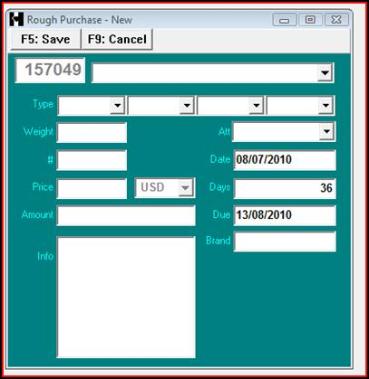
The purchase number on the upper left side is automatically assigned as it is identical to the stock number.
Clicking on the supplier field triggers a view of your contacts .
TYPE specifies the type of rough diamonds.
ATTRIBUTE is an all-purpose criterium that can be used to later make selections in line with specific company
requirements
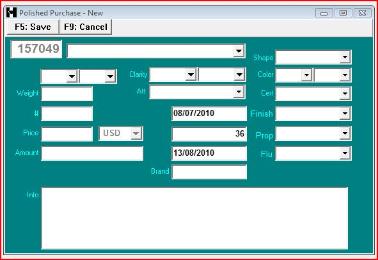
The polished form contains standard specifications for polished diamonds.
Weight is the parcel’s weight.
The “#” field is the number of stones.
Price is the price per carat. When this is filled then Amount is automatically recalculated.
Conversely when the Amount field is filled, then the Price field is recalculated.
Date is the date of purchase. This field defaults to the current date.
Days indicates the number of days until payment is due. When this is filled then Due Date is recalculated, and
conversely.
Info can contain any verbose comment.
To submit the purchase, click Save. If all required fields have been entered then the system asks for confirmation. After
completion the user is prompted with the same purchase in update mode in order to make modifications if required.
To cancel the operation click on the 'Cancel' button. A confirmation screen will be prompted in order to reset all fields to
their default state.
Clicking on the supplier field triggers a view of your contacts .
TYPE specifies the type of rough diamonds.
ATTRIBUTE is an all-purpose criterium that can be used to later make selections in line with specific company
requirements
The polished form contains standard specifications for polished diamonds.
Weight is the parcel’s weight.
The “#” field is the number of stones.
Price is the price per carat. When this is filled then Amount is automatically recalculated.
Conversely when the Amount field is filled, then the Price field is recalculated.
Date is the date of purchase. This field defaults to the current date.
Days indicates the number of days until payment is due. When this is filled then Due Date is recalculated, and
conversely.
Info can contain any verbose comment.
To submit the purchase, click Save. If all required fields have been entered then the system asks for confirmation. After
completion the user is prompted with the same purchase in update mode in order to make modifications if required.
To cancel the operation click on the 'Cancel' button. A confirmation screen will be prompted in order to reset all fields to
their default state.
DH SYSTEMS
Purchase - New
HELP
 | |  | |  | |  | |  |
 |
| |
 |
| |
 |
| |
 |
| |
 |
| |
 |
| |
 |
| |
 |
| |
 |
| |
 |
| |
 |
| |
 |
| |
 |