HELP
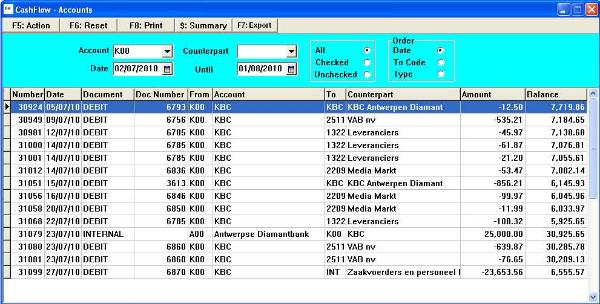
Cash Flow By Account allows for selection from a specific account or any funds repository or to any counterpart. The
Account field is required because the selection takes this as a pivotal point. After clicking on Action every record will display
an in- or an out- transaction related to the selected Account. The Counterpart field is optional. If filled, the selection displays
every transaction from and to both selected Accounts
The Checked / Unchecked feature can be used to verify account statements and keep track of what has been reviewed by
the user. Checked or unchecked fields function as a way to mark records. It is in the Cash Flow Update form that the user
can edit this field. This allows him to double-check data without having to remember where he paused. The user can
determine the meaning of the checked status, but it is generally used to memorize data for further verification.
Clicking on the selection grid will bring up the related detail form of the current record
Account field is required because the selection takes this as a pivotal point. After clicking on Action every record will display
an in- or an out- transaction related to the selected Account. The Counterpart field is optional. If filled, the selection displays
every transaction from and to both selected Accounts
The Checked / Unchecked feature can be used to verify account statements and keep track of what has been reviewed by
the user. Checked or unchecked fields function as a way to mark records. It is in the Cash Flow Update form that the user
can edit this field. This allows him to double-check data without having to remember where he paused. The user can
determine the meaning of the checked status, but it is generally used to memorize data for further verification.
Clicking on the selection grid will bring up the related detail form of the current record
 | |  | |  | |  |
 |
| |
 |
| |
 |
| |
 |
| |
 |
| |
 |
| |
 |
| |
 |
| |
 |
| |
 |
| |
 |
| |
 |
| |
 |

Cash Flow - Accounts
DH SYSTEMS