Cash Flow - Chronological
DH SYSTEMS
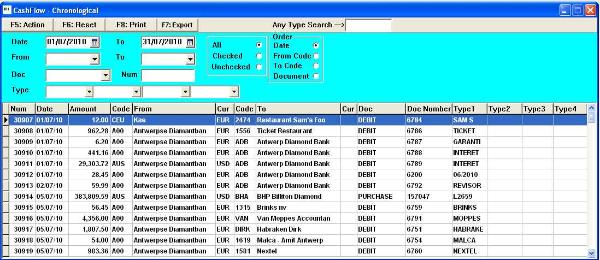
This form allows for multiple searc options in the Cash-Flow history.
The result of the selection reflects the chosen criteria. The user can broaden or make the selection narrower until he isolates
the information he seeks to obtain.
The Checked / Unchecked feature can be used to verify account statements and keep track of what has been reviewed by
the user. Checked or unchecked fields function as a filter to mark records. It is in Cash Flow - Update form that the user can
update this field.
In practice this allows for the user to work with printed reports and verify data without having to remember where he paused.
Allthogh it is for the user to determine the meaning of the checked status, it is generally used to mark records for validation or
verification.
Clicking on the selection grid will bring up the related detail form of the current record.
The result of the selection reflects the chosen criteria. The user can broaden or make the selection narrower until he isolates
the information he seeks to obtain.
The Checked / Unchecked feature can be used to verify account statements and keep track of what has been reviewed by
the user. Checked or unchecked fields function as a filter to mark records. It is in Cash Flow - Update form that the user can
update this field.
In practice this allows for the user to work with printed reports and verify data without having to remember where he paused.
Allthogh it is for the user to determine the meaning of the checked status, it is generally used to mark records for validation or
verification.
Clicking on the selection grid will bring up the related detail form of the current record.
 |
| |
 |
| |
 |
| |
 |
| |
 |
| |
 |
| |
 |
| |
 |
| |
 |
| |
 |
| |
 |
| |
 |
| |
 |
 | |  | |  | |  |